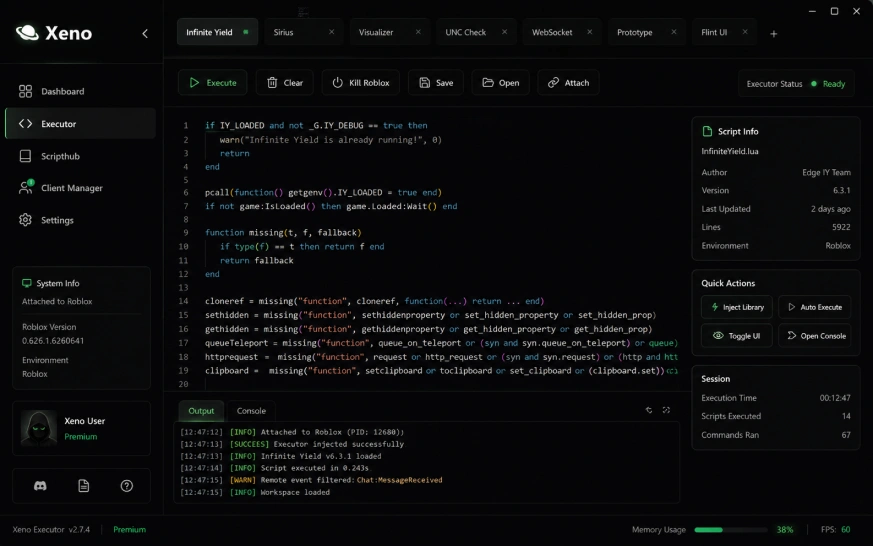
Zero fuss. All function.
Xeno Executor is an execution client stripped of every dark pattern — no key mills, no adfly gates, no timers. Just an editor, an Execute button, and results.
Learn it once, use it anywhere
Open the desktop build, an APK on your phone, or the IPA you sideloaded onto iPad — the workspace is pixel-identical. Same tabs, same shortcuts, same behavior. Nothing to relearn when you switch devices.
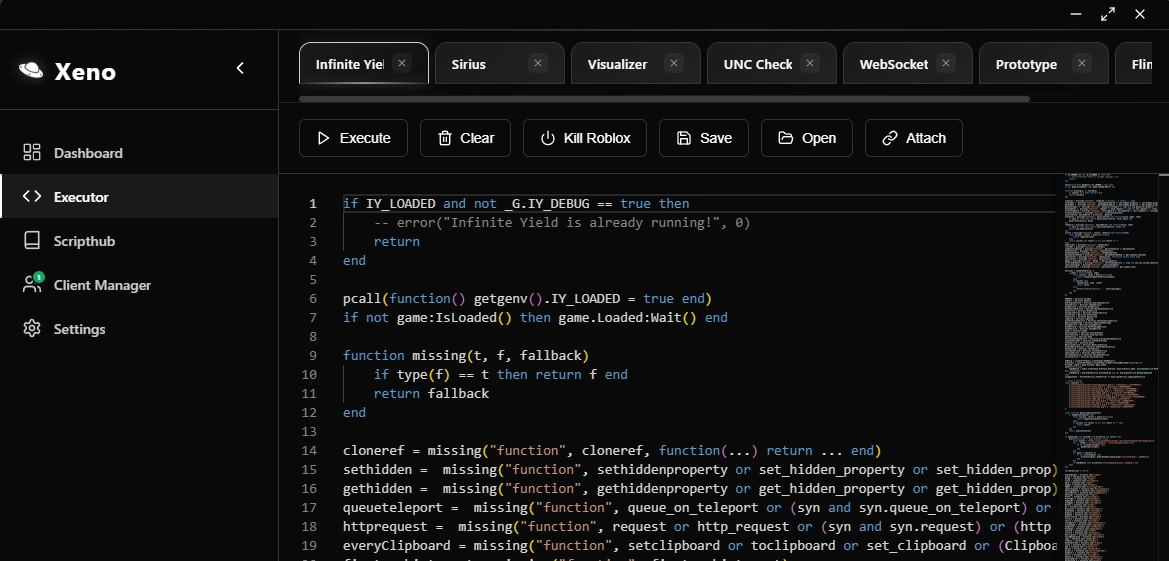
Won't hog your frames
Script work happens on an isolated worker so the render thread never blocks. Heavy hubs execute in the background while your FPS counter stays put.
Where the wins land
Fresh downloads
From one-liners to giant hubs
Whether it's a five-line teleport or a five-thousand-line universal loader with drawing library, HTTP requests, and remote signal spoofing — the runtime chews through it without watching memory climb.
> loadstring(game:HttpGet("https://raw.github…"))()
✔ live · 0.34s · zero prompts
Setup, made trivial
Xeno Executor ships four platforms, four short paths. Tap your device — you're done with the whole setup in about a minute flat.

Windows edition — desktop build
Fetch the setup
One click on Download pulls the current build straight from our signed CDN — about 18 MB.
Skip the AV alarm
Every injector trips Defender on principle. Just add the extracted folder as an exclusion once.
Elevate the launcher
Start it with admin rights — the client needs kernel-level handles to hook the process cleanly.
Fire your first script
Boot up Roblox in any experience, drop code into the tab, press Execute. Nothing else asks for anything.
macOS edition — DMG package
Pull the disk image
One universal .dmg covers every Mac we support — download once, run everywhere.
Wave past Gatekeeper
First launch may show a prompt. Head to System Settings › Privacy & Security and tap "Open Anyway".
Move to Applications
Drag-drop the icon into the Applications shortcut inside the DMG — that's the whole installer.
Hook into Roblox
Open it from Spotlight, join any game, connect the client, and drop your script into the editor.
Android edition — mobile APK
Save the APK
Hit the button below and let the package land in your Downloads — no waiting rooms.
Flip the sideload toggle
On modern Android, the "Install unknown apps" switch is per-browser — enable it for whichever app fetched the file.
Tap to deploy
Open the file, confirm the install sheet, wait a few seconds. Full package weighs around 41 MB.
Jump into a game
Fire up Roblox Mobile, flick over to the runner, paste any script, hit Run. That's the flow.
iOS edition — signed IPA
Grab the IPA
Pull the signed package onto your Mac, PC, or straight into the Files app on iPhone.
Hand it to your sideloader
Whichever tool you already trust — AltStore over Wi-Fi, Sideloadly via USB, TrollStore in one tap — the .ipa slots right in.
Whitelist the cert
Under Settings › General › VPN & Device Management, tap your dev profile once to mark it as trusted.
Send it live
Tap the icon on your home screen, hop into a Roblox lobby, and start running scripts on iOS like it's desktop.
The library your friends are already running
Grind sims, brainrot fads, mobile shooters, the horror hallway everyone streams — Xeno Executor runs their scripts on a soak rig every night before we ship a build, so what worked on Monday still works on Sunday.
Steal a Brainrot
The whole meta this summer. Auto-steal loops don't stutter even in packed lobbies.
- Auto Steal
- Base ESP
- Anti-Trap
99 Nights in the Forest
Survives every night cycle without a hitch — resource radar picks up 200m+ ahead of the fog.
- Loot Radar
- Wolf Warning
- Auto Craft
Fisch
Cast-recast loop holds its rhythm through weather swaps and rare-fish events overnight.
- Perfect Cast
- Auto Sell
- Rare Notify
Rivals
Hitbox tuning stays smooth through Valorant-style peeks — no aim jitter, no rubber-banding.
- Silent Tracker
- Chams
- No-Recoil
Basketball Zero
Shot-timing hook lands greens through any release animation — pre-caches the sweet spot per player.
- Auto Green
- Steal Predict
- Ankle Break
Pet Simulator 99
Overnight breeder + huge hatcher hold flat memory even after 12 hours of chest cycling.
- Auto Farm
- Huge Hunter
- Diamond Multi
Doors
Room predictor calls Rush and Ambush a full corridor early — never eats a jumpscare mid-run.
- Entity Alert
- Key ESP
- Skip Room
Universal loaders, admin panels, custom UI libraries — if the community ships it, Xeno Executor probably already loads it.
Grab the runnerEvery xeno executor release, unpacked
Full release notes going back six months — desktop, Android, iOS, macOS all cut from the same commit. Every entry is tagged with the platforms it touched, the tickets it closed, and the size delta.
Mop-up release after the mobile rewrite lands. Fourteen tickets closed, cold-boot shaved on desktop, and the drag-freeze bug DeX users kept hitting is finally in the ground.
Added
4getgenv().xeno_profile API lets scripts detect the runtime version and gate features by build.Improved
3Fixed
5writefile called from a background timer sometimes silently no-op'd on iOS 17. Now it doesn't.Removed
2syn.request alias. Use request() or http.request() going forward.Two headliners: incremental delta patching lands on every build, and the official signed iOS package ships publicly for the first time. Sixteen tickets closed, two CVEs patched.
Added
7queue_on_teleport, identifyexecutor(), and rconsoleprint() to the standard runtime surface..lua files in ~/xeno/autoexec and they fire on every join.Improved
4Fixed
3Security
2ntdll handle vector reported by a community researcher.Reactive drop after Roblox tightened detection mid-July. Nine tickets, all focused on keeping the attach signature quiet through long sessions.
Improved
2Fixed
6queue_on_teleport was mid-flight. Threads unwind cleanly now.xeno-core.dll dropped by signing the binary with our extended validation cert.readfile() no longer returns stale content on files edited outside the client mid-session.Security
1Follow-up to 2.4.0 cleaning up rough edges from the keyless launch. Nothing dramatic — just steady quality work.
Added
2--minimized launch flag for users who prefer to keep the client in the tray until Roblox opens.Improved
3Fixed
4The build where the key gate finally went away. Full runtime rewrite, file I/O opened up across every platform, and the retirement of three legacy subsystems that had been carrying dead weight since 1.x.
Added
6writefile, readfile, appendfile, listfiles, and getcustomasset now round-trip local assets on all four platforms.hookmetamethod, getnamecallmethod, and getrawmetatable to close the last UNC coverage gaps.Improved
5Fixed
2Removed
3Final 2.3.x release before the keyless rewrite. Focused on stability so users who couldn't migrate immediately would have a solid version to sit on.
Added
3Fixed
5Security
1Xeno Executor vs the field
Same rig, same script set, same afternoon. Solara and Wave are the two names people bring up most often when they're picking a runner — here's where the numbers actually land.
| Metric | SSolara |
WWave |
XXeno Executor
|
|---|---|---|---|
|
Access model
Getting from install to first script
|
Key page daily Linkvertise, 2–3 min |
Weekly checkpoint Ad-gate rotation |
Just launchAlways Zero unlock steps, ever |
|
Script coverage (UNC)
Universal Naming Convention benchmark
|
~72% Drawing lib incomplete |
~85% Missing hookmetamethod |
99% + full drawing All hooks, all fs calls |
|
Cold inject time
Launcher open → script running
|
3.4s Fan spins up audibly |
1.8s Quiet, but noticeable |
0.42s Silent, sub-frame |
|
Platforms shipped
Same runtime, one codebase
|
Windows only x64 desktop |
Win + Mac No mobile builds |
Win · Mac · And · iOS EXE, DMG, APK, IPA |
|
Long-session RAM
12h farm, memory delta
|
+680 MB drift Restart every ~4h |
+180 MB drift Stable to ~8h |
Flat, ±8 MB 12h+ soak-tested |
|
Detection turnaround
Time to re-patch after Roblox update
|
~48h Reactive, no ETA |
~12h Community-driven |
~2–4h Delta patch, auto-push |
|
Update cadence
Time between stable releases
|
Irregular Discord-announced |
~monthly Manual re-download |
~14 days 1 MB delta, signed |
|
Cost
Full feature access
|
$7.99 / mo Free tier is crippled |
$5 / mo Or ad-supported free |
FreeNo gates All builds, all features |
Xeno Executor troubleshooting
Something not lining up? Filter by category on the left, expand the closest match on the right. Every fix here has been reproduced on a clean machine — no vague "try reinstalling" advice. Whether you're on the desktop client or the xeno executor apk, the diagnosis is the same.
- 1Delete the partial file — checksum won't match, retrying on top of it will keep failing.
- 2To download xeno executor apk again, close all browser tabs pointing at the same CDN and open a fresh one.
- 3Disable any VPN briefly — some cheap endpoints (Netherlands, Singapore) rate-limit binary transfers past 40 MB.
- 4Verify the SHA-256 shown on the download page matches the one in
xeno.sig. If it doesn't, the mirror handed you a bad copy — force-refresh (Ctrl+Shift+R) and retry.
- 1Open Windows Security → Virus & threat protection → Manage settings.
- 2Scroll to Exclusions → Add or remove exclusions → Add exclusion → Folder.
- 3Pick the folder where you plan to keep the client (e.g.
C:\Xeno\). Add it before extracting — Defender scans on write. - 4If SmartScreen blocks the .exe on first launch, click More info → Run anyway. The signature is valid, Microsoft just hasn't reputation-signed this build yet.
- 1Make sure you're actually in a game, not at the Play/Home screen. The attach hook needs the game process, not the launcher.
- 2Close every Roblox window (including background ones in the tray), relaunch it, and give it ~8 seconds to finish loading before hitting Attach.
- 3On Windows, right-click the client and choose Run as administrator. Attach fails silently when the client runs at lower integrity than Roblox.
- 4On macOS, grant Screen Recording and Accessibility permissions in System Settings → Privacy — required for the debugger port.
- 1In Settings → Apps → Special app access → Install unknown apps, enable it for the browser or file manager that saved the xeno executor android apk.
- 2If a previous build is installed, uninstall it first. Sideloaded APKs with different signing keys can't upgrade over each other.
- 3On Xiaomi / MIUI, also toggle off MIUI Optimization in Developer options — it silently blocks unsigned installs.
- 4Verify the download completed. A truncated APK throws the same generic error as a permission block — check the file size against the number shown on the download page.
- 1Open the Output console (bottom drawer, or
Ctrl+`). If there's a red line, the script errored — usually a stalegame.Players.LocalPlayerreference before the player fully loads. - 2Wrap the top of the script with
repeat task.wait() until game:IsLoaded()and retry. - 3Confirm the script targets the game you're actually in — universal hubs check
game.PlaceIdand quietly no-op if it doesn't match. - 4If the script depends on
loadstring, verify network egress isn't blocked by a corporate proxy or Pi-hole.
- 1Sideload the xeno executor ipa through AltStore, Sideloadly, or TrollStore as normal.
- 2Open Settings → General → VPN & Device Management.
- 3Under "Developer App", tap the profile name that matches your signing cert → Trust → confirm.
- 4Return to the home screen and launch. If the icon shows a grey exclamation, force-close and reopen once — iOS caches the trust decision on next foreground.
- 1Open the hub's settings menu (usually a keybind —
Right ShiftorInsert). - 2Turn off ESP, tracers, and any drawing feature you're not actively using. Each open drawing element costs ~0.3ms per frame.
- 3In the executor's Settings → Performance, enable Worker offload if it isn't already. Runtime code moves to a background thread; only the paint stays on the main thread.
- 1Open Settings → About and confirm you're on 2.5.0 or newer. Older builds don't account for the newer split keyboards on Samsung One UI.
- 2Enable Floating action bar in Settings → Editor. The Execute/Clear buttons detach into a draggable pill that follows the keyboard up.
- 3On iPad, dismiss the shortcuts bar with the down-arrow in the bottom-right of the keyboard — that alone frees up ~40pt.
- 1Check the System status widget on the left. If Bypass engine shows anything other than "Online", we're already re-signing — sit tight, delta ships as an auto-update within a few hours.
- 2Force the update: Settings → Advanced → Check now. If a new build is out, the xeno executor apk roblox target patches itself in place.
- 3Do not reinstall your OS's Roblox client while the client is out-of-sync — you'll fetch the newest game binary before we've matched it. Wait for our update instead.
- 1Check the runtime's own memory in Settings → Diagnostics. If it's flat (±10 MB over 6 hours), the leak is inside the script.
- 2Look for uncleared signal connections —
:Connect()without a matching:Disconnect()onHeartbeatorRenderSteppedcompounds fast. - 3Add
setrenderpropertyguards or wrap the farm loop in aMaidpattern (many hubs ship one).
xeno-diag.log file in Discord with your build number.- 1The error is misleading — the file is fine, macOS just quarantined it because it was downloaded outside the App Store.
- 2Open Terminal and run:
xattr -cr /Applications/Xeno.app - 3Launch normally. If Gatekeeper still prompts, right-click the app icon → Open → confirm once.
- 1In Settings → Battery, enable Frame cap when backgrounded — Roblox will keep rendering, but the executor's polling loop drops to 30Hz.
- 2Turn off any drawing library features (ESP, tracers) if you don't need them visible during the farm — they're rendered per-frame even offscreen.
- 3Lower Roblox's own graphics quality to 4 or lower. The runtime overhead is dwarfed by the game's own render cost at higher settings.
The six questions worth answering
Everything else can wait. If you're weighing whether Xeno Executor is worth the download, these are the checkboxes to tick first.